How to report a problem or send feedback in SSS Social
Published · 3 min read
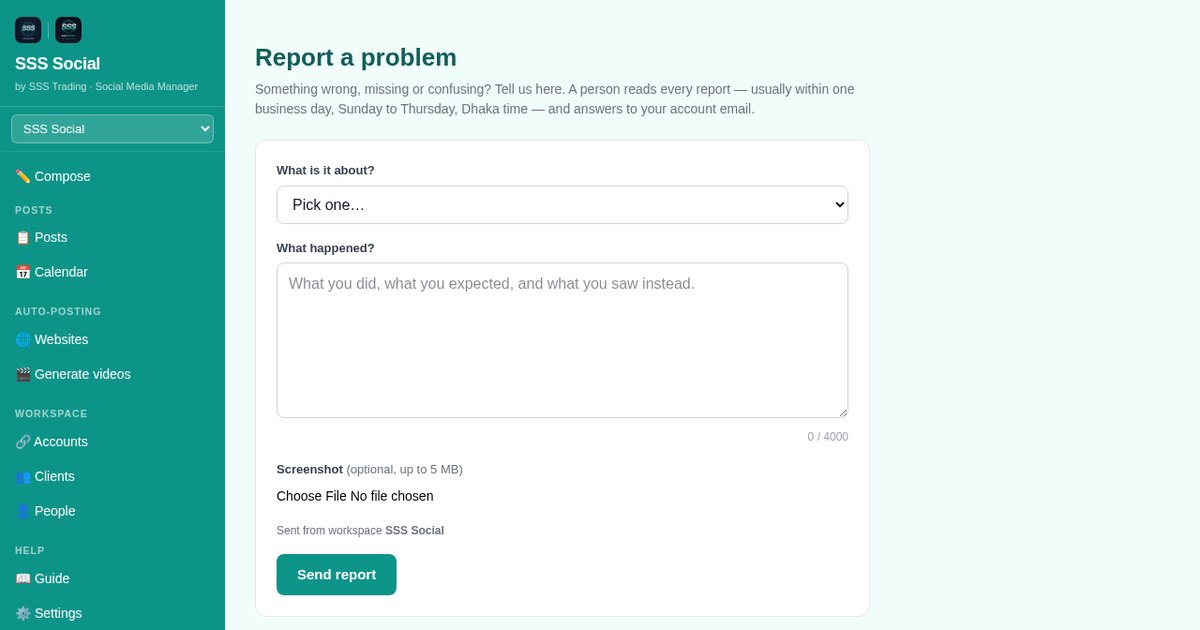
When something goes wrong — or you simply have an idea — you do not need to find an email address. Report a problem is pinned at the bottom of the menu on every page, and under Help.
This article shows where it is, what to put in a report, and what happens after you send it.
Watch the walkthrough
Before you start
- You are signed in. Any member can report — owner or teammate, whatever their role, even while a workspace is locked.
- Optional: a screenshot of what you saw (PNG, JPG, WebP or GIF, up to 5 MB).
Step by step
Step 1: Find Report a problem
It is pinned at the bottom of the menu on every page, so you never have to scroll for it — on a phone, open the ☰ menu first. It is also listed under Help, with the guide and Settings.
 Posts — every post with its status, and the allowance used this period.
Step 2: Say what it is about
Pick one: Something is broken, A post did not go out, Billing or package, Account or sign-in, An idea or request or Something else. The choice sends the report to the right place.
 Report a problem — pinned at the bottom of the menu, and under Help.
Step 3: Describe what happened
Write what you did, what you expected and what you saw instead — a few sentences is plenty, up to 4000 characters. The page you came from and your workspace are attached for you, so you need not describe where you were.
Step 4: Add a screenshot (optional)
A picture of the screen saves a lot of words. Choose an image up to 5 MB; it is stored privately and only the SSS Social team sees it.
Step 5: Send it
Press Send report. You get a reference number at once, the report reaches the team immediately, and a person answers to your account email — usually within one business day, Sunday to Thursday, Dhaka time.
Step 6: Follow your reports
Under Your reports, below the form, every report you have sent is listed as OPEN or ANSWERED. When one is answered, what was done is shown there as Our answer.
Tips
- For a post that did not go out, say which account and which day — the Posts page shows the post as failed or partial, and that is the one to name.
- One problem per report. Two problems in one message take longer to answer than two reports.
- Ideas are welcome: many features in SSS Social started as a request from a client.
Frequently asked questions
Do I need to be signed in?
Yes — the report is tied to your account so we can answer you and look at the right workspace. Not signed in? Email admin@ssstrading.site from the Support page.
How many reports can I send?
Five an hour. If you hit the limit, we already have them — wait a little before sending another.
Will I get a reply?
Yes. A person reads every report and answers to your account email, usually within one business day, Sunday to Thursday, Dhaka time. The answer is also shown under Your reports.
Can a teammate report, or only the owner?
Anyone who is signed in, whatever their role — and even while the workspace is locked by an ended package.
The illustrated version is section 11 of the guide: Report a problem.
Get started
Create your free account — and if anything is unclear, the report link is one tap away.
Create your free account
SSS Social is operated by SSS Trading. Contact: admin@ssstrading.site