How to choose an SSS Social package — and start for free
Published · 4 min read
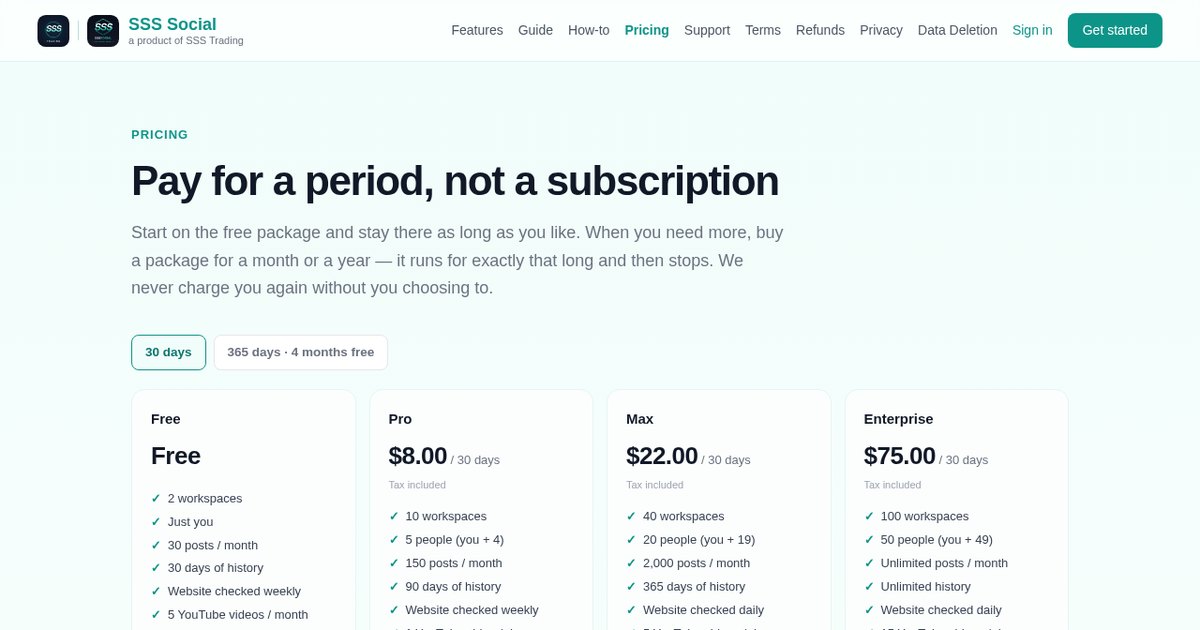
Start on the free package, stay on it for as long as it covers what you post, and buy a paid package only when you need more posts, teammates or videos.
A paid package runs for a fixed 30 or 365 days and then stops — it never renews by itself — so choosing one is a decision about the next month or year, not a subscription to remember to cancel. Here is how to work out which one fits.
Watch the walkthrough
Before you start
- A rough count of how many posts you publish in a month, counted per destination (step 2 explains how).
- How many people need their own login, and how many brands — workspaces — you run.
- A payment card, but only if you decide to buy. Every price is shown on the pricing page before you sign up.
Step by step
Step 1: Start on Free
Every new account is on the Free package: one person, a monthly post allowance, no card and no end date. Composing, scheduling, the calendar, website auto-posting and your posting record all work on it, so you can try the real product before spending anything.
Step 2: Work out what counts
Allowances are counted in posts, and a post counts once for every destination it reaches. One write-up sent to a Facebook Page, an Instagram account and a YouTube channel uses three. Each language a website article is posted in is its own post. Drafts never count, a delivery that fails costs nothing, and a scheduled post that would go over the allowance is held, not lost — it goes out when the allowance resets.
 Posts — every post with its status, and the allowance used this period.
Step 3: Compare the packages
Open Pricing. The paid packages are Pro, Max and Enterprise. They differ mainly in how much you can do — posts a month, workspaces, team members, videos — far more than in which features you get. Each card lists its limits, and the price shown is the total you pay, with any tax already included.
Step 4: Pick 30 days or 365 days
Every paid package can be bought for 30 days or for 365 days, and the longer period works out cheaper per month — the pricing page shows both prices side by side. Either way the package runs for exactly that long and then stops. Nothing is charged again unless you choose to buy again.
Step 5: Add an add-on if one need outgrows Free
Add-ons cover a single need without changing package: AI writing (post wording written for each article in your tone), video (more generated videos) and unlimited history (your full posting record in Analytics). AI writing and video can be added to any package, including Free; the pricing page lists every add-on with its price.
Step 6: Buy as the workspace owner
Only the workspace owner can buy a package. Payment is by card at a secure checkout run by Creem, the merchant of record, which handles the payment, the tax and the invoice. You come back to SSS Social with the package active straight away.
Step 7: Check your usage
Your current package and its usage meters are under Settings, alongside how posts are counted and the tax and refund details. The Posts page shows how much of this period’s allowance you have used.
 Settings — your package, usage, password and keys.
Tips
- Unsure about volume? Buy 30 days first. Once you know how much you post, buy 365 days next time.
- On a paid package, add your own AI key in Settings and AI writing stops counting against an allowance — your AI provider bills you directly.
- Limits are per person and shared across every workspace you own, so one package covers all your brands.
Frequently asked questions
Does an SSS Social package renew automatically?
No. A package runs for the period you paid for, 30 or 365 days, and then stops. Nothing is charged again unless you choose to buy again, so there is no subscription to cancel.
What happens when a paid package ends?
You return to the free package. Nothing is deleted: posts, drafts and connected accounts all stay. If you have more workspaces or teammates than the free package covers, the extra ones are locked, with everything in them kept, until a package covers them again.
Can I end a package early?
Yes, the workspace owner can. Ending early forfeits the rest of the period you paid for, so the product asks you to confirm twice. Refunds follow the published refund policy.
Is tax included in the price?
Yes. The price shown is the total you pay. Any VAT or sales tax due is already included, and nothing is added at checkout.
The illustrated version is section 2 of the guide: Pick a plan (you can start free).
Get started
Start on the free package today — no card needed — and upgrade only when you need more.
Create your free account
SSS Social is operated by SSS Trading. Contact: admin@ssstrading.site