How to create an SSS Social account and your first workspace
Published · 4 min read
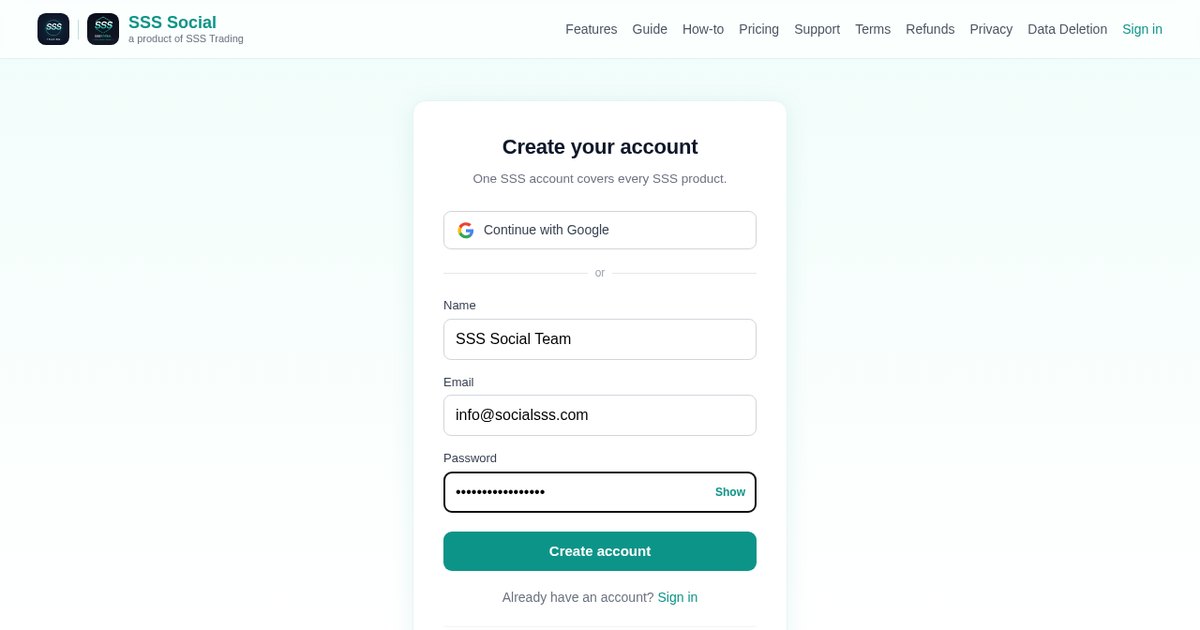
You can have a working SSS Social account in about two minutes: sign up with your email or with Google, and your first workspace — the place where your connected accounts, posts and team live — is created for you.
This article walks through signing up, what a workspace is, when to create more than one, and how to bring teammates in.
Watch the walkthrough
Before you start
- An email address you can open, or a Google account.
- The name of the brand or business you will post for — it becomes the name of your workspace.
- Nothing to pay. Every account starts on the free package, with no card needed.
Step by step
Step 1: Open the sign-up page
Go to Create your free account. Continue with Google for a one-click sign-up, or fill in your name, your email and a password. The same SSS account also signs you in to other SSS products, so you only ever need one login.
Step 2: Create the account
Press Create account. If you signed up with an email, keep the password somewhere safe — you can change it at any time under Settings. There is no trial clock to watch: the free package does not expire.
Step 3: Meet your first workspace
A workspace is one brand or company. Its connected social accounts, its posts and drafts, its calendar, its website and its team all live together inside it, and nothing leaks into another workspace. Your first workspace is made for you the moment you sign up, so you land straight in the app instead of on a setup form.
Step 4: Find your way around
On a computer every page is in the sidebar on the left — Compose, Calendar, Posts, Websites, Generate videos, Clients, Accounts, Analytics, People, Settings and Guide. On a phone the same pages sit behind the ☰ menu button in the top-left corner.
Step 5: Add a workspace for each extra brand
Running more than one brand? Create a separate workspace for each and switch between them from the workspace menu. Your package belongs to you rather than to a workspace, so its allowances are shared across every workspace you own. How many workspaces each package includes is listed on the pricing page.
Step 6: Invite teammates (paid packages)
The free package is for one person. On a paid package, open People and invite teammates by email, giving each a role — admin, manager, editor or reviewer — or a custom set of permissions such as composing posts or managing connected accounts. Each invitee gets an email link and joins with their own SSS account.
 People — where teammates are invited and given a role.
Step 7: Connect your first social account
With the workspace ready, open Accounts and connect a Facebook Page, Instagram, TikTok or YouTube. That is covered step by step in how to connect your social accounts.
 Accounts — every connected platform, with its own Connect or Disconnect button.
Tips
- Name each workspace after the brand its audience knows — it is the name you will see in the workspace menu every day.
- Use one workspace per brand, not one per platform. A single post can go to every connected account in its workspace at once.
- If several people will work on the account, give each their own login through People instead of sharing a password. Posts from anyone without publish permission then wait for a teammate who can publish to approve them.
Frequently asked questions
Do I need a credit card to sign up for SSS Social?
No. Every account starts on the free package, which needs no card and does not expire. You only pay if you later choose to buy a paid package.
What is the difference between an account and a workspace?
Your account is you: your login and the package you own. A workspace is one brand or company, with its own connected social accounts, posts, calendar and team. One account can own several workspaces, and the package limits are shared between them.
Can teammates use the free package?
No. The free package is a single seat. Inviting teammates, and the approvals that come with them, start with the paid packages.
Can I sign up with Google?
Yes. Continue with Google on the sign-up page creates the account in one step. You can also sign up with an email address and a password.
The illustrated version is section 1 of the guide: Create your account and workspace.
Get started
Create your free account now — your first workspace is ready the moment you sign up.
Create your free account
SSS Social is operated by SSS Trading. Contact: admin@ssstrading.site