Your 2026 holiday posting plan in one afternoon
Published · 4 min read
It’s 23 December and you’re posting the same sale for the fourth time today — from four different apps, with cold coffee. It is not festive. This year, plan the whole month in one afternoon in November instead.
Here is the plan, step by step, so you can do the same: what to post, when, and how to send each post to Facebook, Instagram, TikTok and YouTube at once — then leave it to go out by itself.
Watch: December, planned in one afternoon
Before you start
- Your December dates: sales, last order days, opening hours, days off.
- At least one connected account — a Facebook Page, Instagram, TikTok or YouTube. See how to connect your social accounts.
- Your photos and short clips in one folder.
Step by step
Step 1: Mark the dates that matter
Black Friday (27 November) and Cyber Monday (30 November), your last shipping day, Christmas Eve, Boxing Day, New Year — anything you would be annoyed to miss. Write them down before you write a single post.
Step 2: Pick a rhythm you can keep
Three posts a week is plenty for most small businesses. Add one on each key date. A rhythm you keep beats a burst you abandon in week two.
Step 3: Write the posts in one sitting
One idea per post: the offer, the deadline, a behind-the-scenes, a thank-you. Save repeat formats as templates and your hashtags as a hashtag group, so the tenth post takes seconds, not minutes.
Step 4: Write once, send everywhere
In Compose, tick every connected account. One post goes to all of them — no copying captions between apps. See how to publish one post to every channel.
 Compose — format, caption, media and destinations on one screen.
Step 5: Schedule, don’t post
Pick each post’s date and time and schedule it. It waits on the Calendar and goes out by itself, even when nobody is signed in. There is no limit on how far ahead — schedule December today.
Step 6: Check the month at a glance
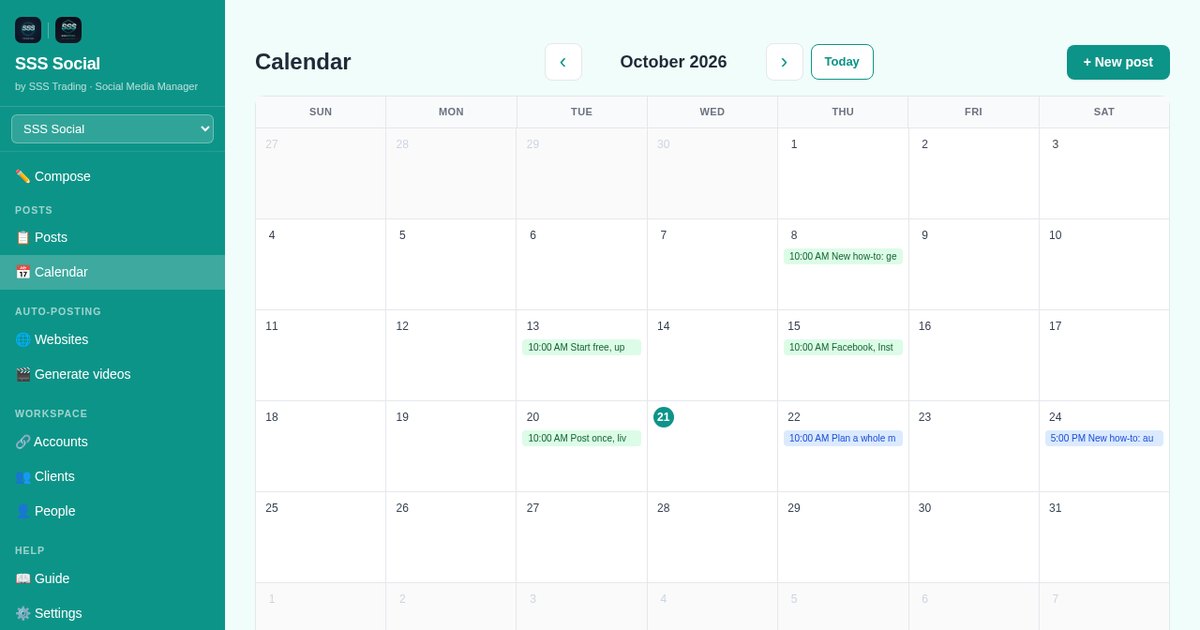
Open Calendar. It shows gaps and crowded days at once. Open any post to change its words, its media or its time — right up until the moment it publishes. More in how to schedule posts with the calendar.
 The Calendar — a month of queued, published and failed posts.
Step 7: Let your blog post itself
If you publish holiday articles or gift guides, connect the website once; each new article becomes a post (and, with a video allowance, a short video). See how to auto-post your blog articles.
Step 8: Then leave
A post that hits a temporary platform problem is retried, and a post that still fails goes back on your schedule by itself. You get an email, not a surprise. Go and actually have the holidays.
A worked example
This is an example, not a measurement. The inputs are listed in full — open them in the calculator and change them to match how you work.
Example inputs: 4 posts a week, each to 4 networks, for 1 business; 10 minutes per post per network by hand; 5 minutes per post in SSS Social; no videos; an hour valued at $15. Four a week is roughly three regular posts plus the six key dates, over one holiday season — 27 November to 26 December, one 30-day package.
- Posting by hand: 11 hours every 30 days
- With SSS Social: 1.4 hours every 30 days
- Time back: 10 hours every 30 days
- Worth, at that rate: $150 every 30 days
- Free ($0 for 30 days): not enough for this example.
- Pro ($8.00 for 30 days): the time back is worth about 18× the price — the package that fits.
- Max ($22.00 for 30 days): the time back is worth about 6× the price.
Open this example in the calculator
Tips
- Schedule the “last order day” post twice: three days before, and on the morning itself.
- Keep one free slot a week for something that actually happens.
- Plan now, buy later. Writing and scheduling are free, so plan the whole season on the free package today. Buy your 30 days on the morning your first holiday post goes out — bought on Black Friday, 27 November, it covers you to 27 December. A package starts the moment you buy it.
- Packages run for a fixed 30 or 365 days and never renew — buying one for December does not sign you up for January. Every package is on the pricing page.
Frequently asked questions
How far ahead can I schedule posts?
As far as you like. You can schedule all of December’s posts today.
Can I change a post after scheduling it?
Yes. Open it from the Calendar or the Posts page and change the wording, media or time, or cancel it, at any point until it publishes.
Do scheduled posts use my allowance now?
No. A post counts when it goes out, once for each destination it reaches. A delivery that fails costs nothing.
What happens to posts scheduled after my package ends?
Nothing is deleted. They still go out, on the free package’s allowance of 30 posts a month, with no automatic videos; any beyond that wait on your Calendar until the next month’s allowance starts. Workspaces beyond the free package’s two are locked, and their posts wait until a package covers them again.
If I buy a package for December, will it renew in January?
No. Packages last a fixed 30 or 365 days and nothing renews. Nothing is charged again unless you choose to buy again.
Get started
Plan December this afternoon. Try it free — no card, nothing renews.
Create your free account
SSS Social is operated by SSS Trading. Contact: admin@ssstrading.site